

|
|
Design Units |
Post Reply 
|
| Author | |||||||||
Nick B 
Admin Group 

Joined: 02 Jan 2012 Status: Offline Points: 2106 |
 Post Options Post Options
 Thanks(0) Thanks(0)
 Quote Reply Quote Reply
 Topic: Design Units Topic: Design UnitsPosted: 20 Aug 2026 at 11:00am |
||||||||
|
PCB Footprint Expert Design Units User Interface 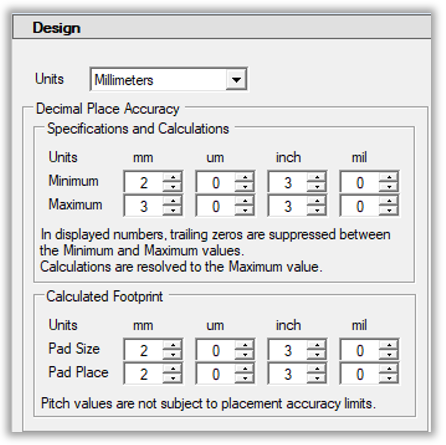 There are 4 options (millimeter, micrometer, inch, mil) for units, but millimeter is the most popular today because most package dimensions in manufacturer datasheets are displayed in millimeter units. Decimal Place Accuracy > Minimum / Maximum Most PCB Library Parts are created in millimeter units to match the current package datasheet, but everyone is in a different environment. The new "Units" allows you to set the Minimum and Maximum rounding values. By setting the Minimum and Maximum values, you establish the program rounding values. Example 1: using 2 place Minimum accuracy, entering a 0.8 value, will display as 0.80. The program will automatically add a trailing zero to round the value 2 place minimal accuracy. Example 2: using 2 place Maximum accuracy, all values will be rounded up to the nearest 0.01. Entering a 0.025 value would display as 0.03. The program default settings are Minimum 2 and Maximum 3. Because the minimum is 2, the program will automatically remove all training zero’s past 2 places. And the maximum setting of 3 will only round up values less than one micrometer. Example 3: using a 3 place Maximum accuracy, a value of 0.3255 will be rounded up to 0.326 Example 4: using a 2 place Minimum accuracy, a value of 0.29 will be rounded up to 0.30
The most important thing is that both the minimum and maximum options go up to 6 places. This accuracy is intended to increase the rounding accuracy when converting between Metric and Imperial units. It is not recommended that users select 6/6 as their min/max because this will affect the Physical Description that is auto generated by Footprint Expert in the FPX file. Having every value 6 places to the right of the decimal point would also affect every component family calculator, as every value will be rounded and displayed with 6-point accuracy. A simple value of 0.01 would display as 0.010000 and the Physical Description would be the same. 
 The Footprint Expert automates footprints to perfection. Professional, detailed, and accurate parts - all built consistently with identical rules, regardless of how many people are involved in your library development. Get your FREE Footprint Calculator or Footprint Expert Evaluation License: https://www.PCBLibraries.com/Register Call us - 847-557-2300 |
|||||||||
 |
|||||||||

|
|||||||||
|
|||||||||
|
Post Reply
|
|
| Tweet |
| Forum Jump | Forum Permissions You cannot post new topics in this forum You cannot reply to topics in this forum You cannot delete your posts in this forum You cannot edit your posts in this forum You cannot create polls in this forum You cannot vote in polls in this forum |


 Topic Options