

|
|
Master Options File or CAD Tool Translator Issue |
Post Reply 
|
| Author | |
Nick B 
Admin Group 

Joined: 02 Jan 2012 Status: Offline Points: 1992 |
 Post Options Post Options
 Thanks(0) Thanks(0)
 Quote Reply Quote Reply
 Topic: Master Options File or CAD Tool Translator Issue Topic: Master Options File or CAD Tool Translator IssuePosted: 13 hours 34 minutes ago at 5:24pm |
|
If you experience one of these issues:
It is probably because you are using the same OPT options file as both your "CAD tool translator" OPT file and "Master Options" file. These two are separate files. As a matter of fact, there are three OPT option files: 1. Console Options - edit in Tools > Options 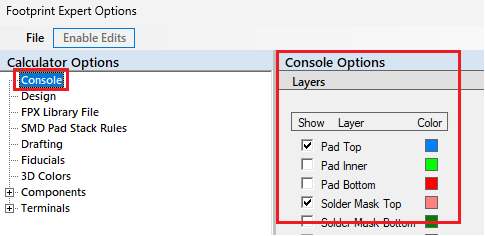 2. Master Options - edit in Tools > Options 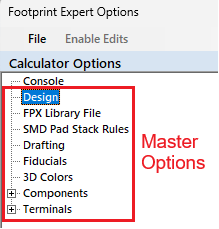 3. CAD Tool Options - edit in the "Build Footprint" window 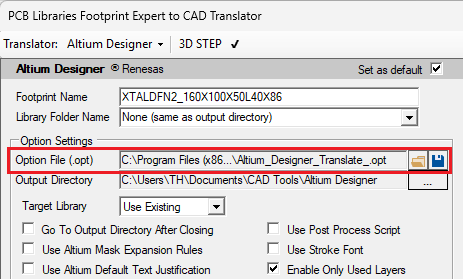 |
|
 |
|

|
|
|
|
|
Post Reply
|
|
| Tweet |
| Forum Jump | Forum Permissions You cannot post new topics in this forum You cannot reply to topics in this forum You cannot delete your posts in this forum You cannot edit your posts in this forum You cannot create polls in this forum You cannot vote in polls in this forum |


 Topic Options