

|
|
CAD Translator ME Layer Assignments |
Post Reply 
|
Page 123> |
| Author | |
ChrisChris 
Advanced User 
Joined: 03 Nov 2021 Status: Offline Points: 92 |
 Post Options Post Options
 Thanks(0) Thanks(0)
 Quote Reply Quote Reply
 Topic: CAD Translator ME Layer Assignments Topic: CAD Translator ME Layer AssignmentsPosted: 01 Apr 2024 at 7:15am |
|
Hi Jeff,
Just wanted to make sure you saw my comment a few days about about the beta build still opening a Save As dialog. Wasn't sure if I posted that as a response to you or not. Thanks, Chris
|
|
 |
|

|
|
|
|
|
ChrisChris
Advanced User
Joined: 03 Nov 2021 Status: Offline Points: 92 |
Post Options
Thanks(0)
Quote Reply
Posted: 28 Mar 2024 at 12:03pm |
|
Jeff,
I only went this far, but the layer assignments are not updating when I switch option files. 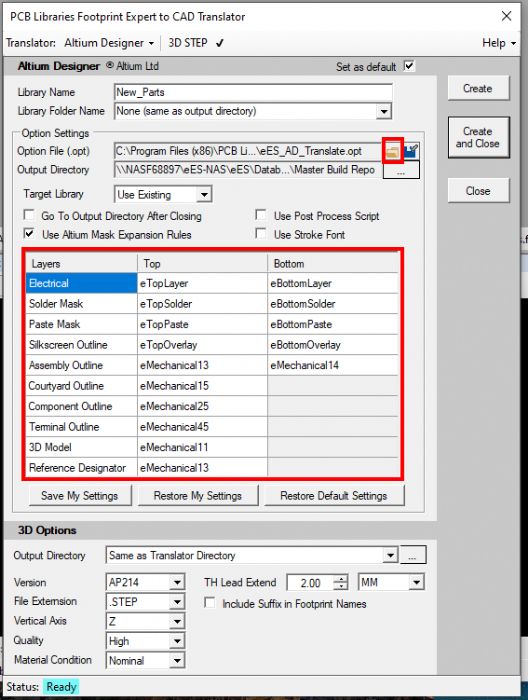 I've attached the two different options files I am trying to switch between. Thanks, Chris |
|
|
|
|
ChrisChris
Advanced User
Joined: 03 Nov 2021 Status: Offline Points: 92 |
Post Options
Thanks(0)
Quote Reply
Posted: 28 Mar 2024 at 11:42am |
|
OK, I think I missed the fine print and didn't explicitly click on this...
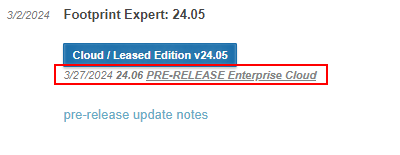 Checking it now...
|
|
|
|
|
Tom H
Admin Group 

Joined: 05 Jan 2012 Location: San Diego, CA Status: Offline Points: 5982 |
Post Options
Thanks(0)
Quote Reply
Posted: 28 Mar 2024 at 9:27am |
|
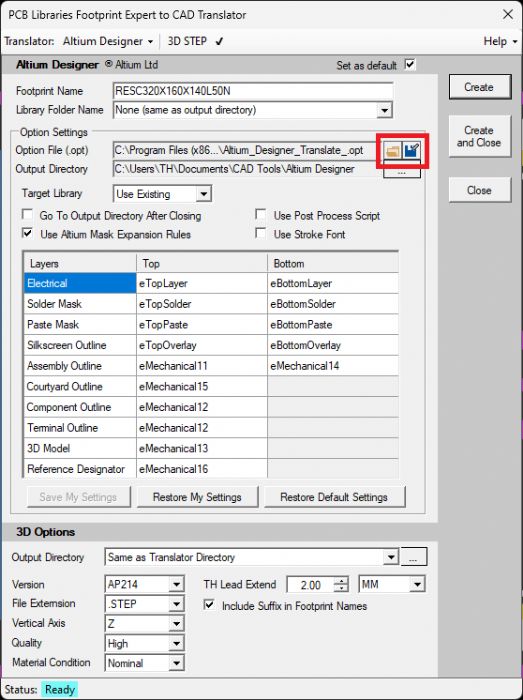
Here are the new Altium Translator buttons to Open & Save Option files:
 |
|
|
|
|
Jeff.M
Admin Group

Joined: 16 May 2012 Location: San Diego Status: Offline Points: 496 |
Post Options
Thanks(0)
Quote Reply
Posted: 28 Mar 2024 at 9:11am |
|
You'll need the V24.06 pre-release dated 3/27.
|
|
|
|
|
ChrisChris
Advanced User
Joined: 03 Nov 2021 Status: Offline Points: 92 |
Post Options
Thanks(0)
Quote Reply
Posted: 28 Mar 2024 at 6:39am |
|
Hi Tom, Jeff,
I'm not seeing any change using the installer in the supplied link. I completely uninstalled all other instances of FP Expert to make sure I wasn't opening an older revision by accident. About is showing version v.05. 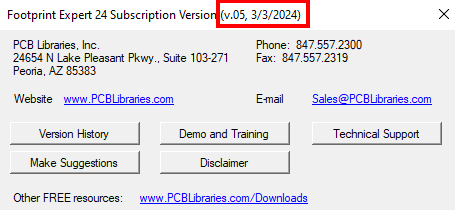 Clicking the ellipses in the translator still takes me to a Save As dialog. 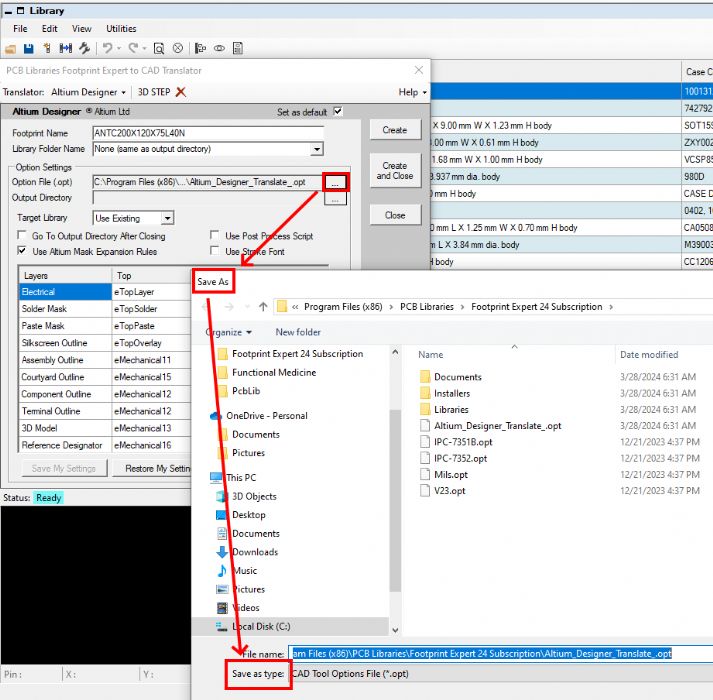 Perhaps the installer at the provided link is incorrect? I am stuck in meetings for the next 5 hours but can test any additional update you provide after that. Thanks, Chris |
|
|
|
|
Tom H
Admin Group
Joined: 05 Jan 2012 Location: San Diego, CA Status: Offline Points: 5982 |
Post Options
Thanks(0)
Quote Reply
Posted: 27 Mar 2024 at 8:39pm |
|
The issue you reported is fixed. Download and install V24.06 pre-release - www.pcblibraries.com/downloads
Let us know if it's OK for official release. |
|
|
|
|
ChrisChris
Advanced User
Joined: 03 Nov 2021 Status: Offline Points: 92 |
Post Options
Thanks(0)
Quote Reply
Posted: 27 Mar 2024 at 10:21am |
|
No worries, and thank you!
|
|
|
|
|
Jeff.M
Admin Group
Joined: 16 May 2012 Location: San Diego Status: Offline Points: 496 |
Post Options
Thanks(0)
Quote Reply
Posted: 27 Mar 2024 at 10:16am |
|
Sorry, sometimes you have to get slapped in the face to see the problem.
I'm fixing it now and it'll be in a new release in the morning. Jeff
|
|
|
|
|
ChrisChris
Advanced User
Joined: 03 Nov 2021 Status: Offline Points: 92 |
Post Options
Thanks(0)
Quote Reply
Posted: 27 Mar 2024 at 9:12am |
|
Jeff,
I already HAVE the options file. I want to switch to it. I'm asking how to select an already existing options file, not how to create one. Standard Windows "browse to" functionality. Thanks, Chris
|
|
|
|
|
Post Reply
|
Page 123> |
| Tweet |
| Forum Jump | Forum Permissions You cannot post new topics in this forum You cannot reply to topics in this forum You cannot delete your posts in this forum You cannot edit your posts in this forum You cannot create polls in this forum You cannot vote in polls in this forum |


 Topic Options