

|
|
Adding Pin 1 Dot on Assembly Layer |
Post Reply 
|
Page <123 |
| Author | |
Tom H 
Admin Group 

Joined: 05 Jan 2012 Location: San Diego, CA Status: Offline Points: 6096 |
 Post Options Post Options
 Thanks(0) Thanks(0)
 Quote Reply Quote Reply
 Posted: 25 Sep 2025 at 8:34am Posted: 25 Sep 2025 at 8:34am |
|
In V25.10 we added a new feature to replace the Assembly Polarity Chamfer with a Dot. V25.10 is the last release this year and we're currently preparing it for the official release next week in October. We might be able to do that in V26 next year. |
|
 |
|

|
|
|
|
|
m.elsayed
Committee 
Joined: 22 Sep 2016 Status: Offline Points: 269 |
Post Options
Thanks(0)
Quote Reply
Posted: 25 Sep 2025 at 8:37pm |
|
I think this parameter releated for feature added not new feature from scratch
Even our discussion shows it requested from start so feature can be helpful
|
|
|
|
|
tgrodnicki
Advanced User 
Joined: 30 Sep 2014 Status: Offline Points: 141 |
Post Options
Thanks(0)
Quote Reply
Posted: 25 Sep 2025 at 11:14pm |
|
The polarity marker on the Silkscreen layer (as it's used for post-assembly inspection) is outside the footprints's outline. For the Assembly layer, I prefer to place the marker inside the outline. If Footprint Expert will have an option to place it in the same location as the dot on the Silkscreen layer, I'll probably never use it.
|
|
|
|
|
Tom H
Admin Group
Joined: 05 Jan 2012 Location: San Diego, CA Status: Offline Points: 6096 |
Post Options
Thanks(0)
Quote Reply
Posted: 26 Sep 2025 at 8:08am |
|
Here is the new Assembly Polarity Dot in a SOP footprint.
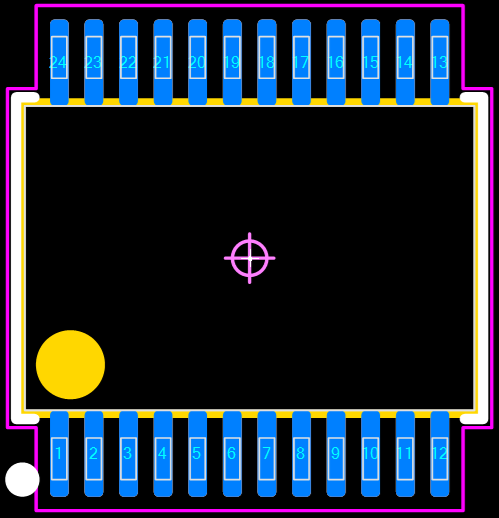 You can select the Minimum / Maximum dot diameter in Assembly > Options. You can toggle between Assembly Chamfer and Dot, whichever you like best. Options are not saved to FPX. Options are automatically applied when you open a footprint. |
|
|
|
|
m.elsayed
Committee
Joined: 22 Sep 2016 Status: Offline Points: 269 |
Post Options
Thanks(0)
Quote Reply
Posted: 28 Sep 2025 at 1:53am |
|
great , Thanks, Tom
giving user ability to set location of assembly dot same as silkscreen, it will be great, just if checked ok, if not check default value as cahmfer, great control and will help users more
|
|
|
|
|
Post Reply
|
Page <123 |
| Tweet |
| Forum Jump | Forum Permissions You cannot post new topics in this forum You cannot reply to topics in this forum You cannot delete your posts in this forum You cannot edit your posts in this forum You cannot create polls in this forum You cannot vote in polls in this forum |


 Topic Options