
|
|
SOT143 Polarity Pin |
Post Reply 
|
| Author | |
ejkreiner 
Active User 
Joined: 30 Mar 2012 Location: Cincinnati, OH Status: Offline Points: 37 |
 Post Options Post Options
 Thanks(1) Thanks(1)
 Quote Reply Quote Reply
 Topic: SOT143 Polarity Pin Topic: SOT143 Polarity PinPosted: 23 Apr 2014 at 6:16am |
|
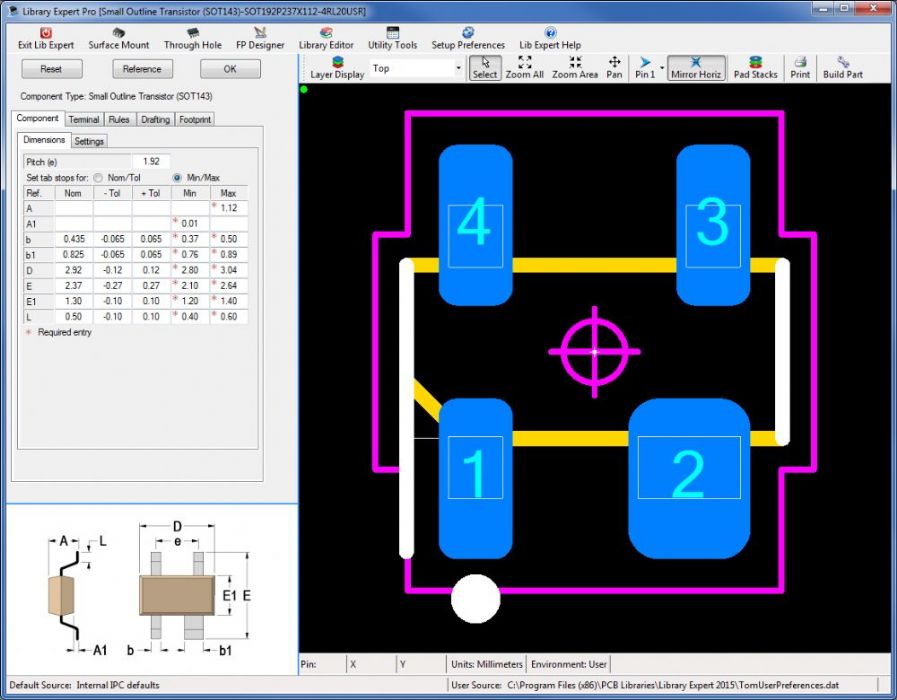
I am building a SOT143 package and when I calculate the footprint the larger pad for polarity is on Pin 1. I need to change it to Pin 2 and I thought previously FPE had that functionality added but I am not seeing how I can change the polarity. Can you advise? |
|
 |
|

|
|
|
|
|
Tom H
Admin Group 

Joined: 05 Jan 2012 Location: San Diego, CA Status: Offline Points: 6098 |
Post Options
Thanks(1)
Quote Reply
Posted: 23 Apr 2014 at 6:20am |
|
Did you try the "Mirror" feature? |
|
|
|
|
ejkreiner
Active User
Joined: 30 Mar 2012 Location: Cincinnati, OH Status: Offline Points: 37 |
Post Options
Thanks(1)
Quote Reply
Posted: 23 Apr 2014 at 6:37am |
|
I did Tom. Polarity needs to be on pin 2, which is lower left as you are seeing the footprint preview.
I have tried every combination of L/R/U/D and mirror and get the polarity set on the LL where I want it, but when I redorder the pins the polarity pad is flipping to the UR pin and the pin number reorder themselves from 1-4 CCW with pin 1 UL to to 1-4 CW with pin one now LL and polarity pad on pin 3. |
|
|
|
|
Jeff.M
Admin Group

Joined: 16 May 2012 Location: San Diego Status: Offline Points: 501 |
Post Options
Thanks(1)
Quote Reply
Posted: 23 Apr 2014 at 6:39am |
|
After building the part left-click on the pin you want to be the new pin one. Then right-click and select 'Reorder Pins'.
Left-click on the pins in the order you want them to increment. Right-click and select 'Done Reordering' and save or build.
|
|
|
|
|
ejkreiner
Active User
Joined: 30 Mar 2012 Location: Cincinnati, OH Status: Offline Points: 37 |
Post Options
Thanks(1)
Quote Reply
Posted: 23 Apr 2014 at 6:47am |
|
Jeff, when I calculate the part the pin order is set the way it needs to be. Pin one is upper left in the preview window and the pins increment 2-4 counterclockwise. Pin 1 has the larger polarity pad. I need the polarity pad to be on pin 2. It seems to be blind luck using mirror/orientation buttons to get the larger pad on the lower left pin. When I do that and try to reorder the pins back to where they need to be it goes haywire.
|
|
|
|
|
ejkreiner
Active User
Joined: 30 Mar 2012 Location: Cincinnati, OH Status: Offline Points: 37 |
Post Options
Thanks(1)
Quote Reply
Posted: 23 Apr 2014 at 6:53am |
|
I have captured screenshots of what it is doing. Is there a way to upload them here or can I email them to you?
|
|
|
|
|
Jeff.M
Admin Group
Joined: 16 May 2012 Location: San Diego Status: Offline Points: 501 |
Post Options
Thanks(1)
Quote Reply
Posted: 23 Apr 2014 at 7:10am |
|
email to: jeff.mellquist*at*pcblibraries*dot*com
|
|
|
|
|
ptkvgl
Active User
Joined: 04 Jun 2014 Status: Offline Points: 19 |
Post Options
Thanks(1)
Quote Reply
Posted: 16 Jan 2015 at 7:03am |
|
Hello!
Did you get this problem solved? I've got the same one and can't understand how to use the "Reorder Pins" functionality... I would like to generate a "SC-82AB" footprint. Unfortunately I can't get pin 1 (small) and pin 2 (large) placed according to the datasheet... Please could you tell me, what am I doing wrong? Thanx in advance... |
|
|
|
|
Tom H
Admin Group
Joined: 05 Jan 2012 Location: San Diego, CA Status: Offline Points: 6098 |
Post Options
Thanks(2)
Quote Reply
Posted: 16 Jan 2015 at 8:57am |
|
This is fixed in V2015.06. This is a SOT143 Reverse.
|
|
|
|
|
ptkvgl
Active User
Joined: 04 Jun 2014 Status: Offline Points: 19 |
Post Options
Thanks(1)
Quote Reply
Posted: 19 Jan 2015 at 12:45am |
|
Hi Tom,
In fact, pretty easy... Thank you very much and have a nice day... |
|
|
|
|
Post Reply
|
|
| Tweet |
| Forum Jump | Forum Permissions You cannot post new topics in this forum You cannot reply to topics in this forum You cannot delete your posts in this forum You cannot edit your posts in this forum You cannot create polls in this forum You cannot vote in polls in this forum |


 Topic Options