

|
|
Size Over Hole |
Post Reply 
|
| Author | |
hbostrom 
Active User 
Joined: 04 Nov 2016 Status: Offline Points: 38 |
 Post Options Post Options
 Thanks(1) Thanks(1)
 Quote Reply Quote Reply
 Topic: Size Over Hole Topic: Size Over HolePosted: 08 Nov 2016 at 4:05am |
|
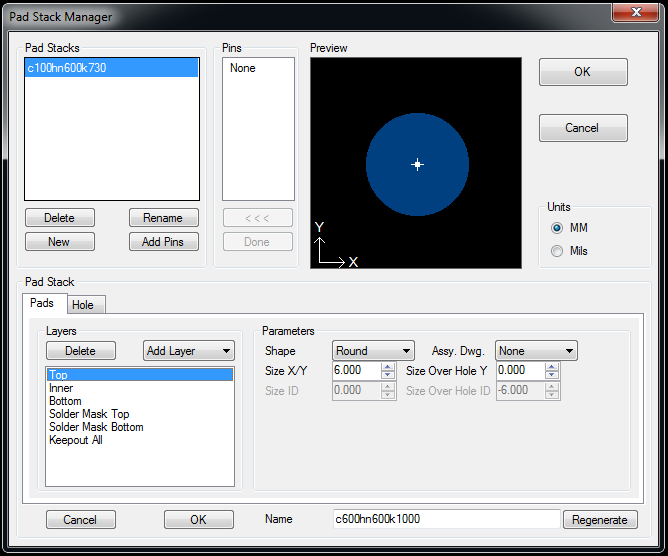
Maybe a stupid question but, what is the meaning of the option "Size over hole"? If a define a through hole padstack with a diameter of 3mm and then check the padstack manager, the parameters show "Size/XY" 1mm and "Size Over Hole Y" -2mm.
|
|
 |
|

|
|
|
|
|
Tom H
Admin Group 

Joined: 05 Jan 2012 Location: San Diego, CA Status: Offline Points: 6106 |
Post Options
Thanks(0)
Quote Reply
Posted: 08 Nov 2016 at 8:15am |
|
Where do you see "Size Over Hole" in Library Expert? |
|
|
|
|
hbostrom
Active User
Joined: 04 Nov 2016 Status: Offline Points: 38 |
Post Options
Thanks(0)
Quote Reply
Posted: 09 Nov 2016 at 8:34am |
|
|
|
|
|
Tom H
Admin Group
Joined: 05 Jan 2012 Location: San Diego, CA Status: Offline Points: 6106 |
Post Options
Thanks(0)
Quote Reply
Posted: 09 Nov 2016 at 9:20am |
|
The Size over the Hole is exactly that. Example: you have a 1.10 pad with a 0.70 hole = 0.40 Size over the Hole You have the choice of changing the Pad Size or the Size over the Hole value. |
|
|
|
|
hbostrom
Active User
Joined: 04 Nov 2016 Status: Offline Points: 38 |
Post Options
Thanks(0)
Quote Reply
Posted: 10 Nov 2016 at 12:22am |
|
But then it doesn't really make sense when the program automatically fills in a negative value for that option. And I still don't see when I would want to use this, all that's needed to define a hole is the drill diameter and the pad diameter, this third parameter is just confusing and it's not at all clear what it's purpose is.
|
|
|
|
|
Tom H
Admin Group
Joined: 05 Jan 2012 Location: San Diego, CA Status: Offline Points: 6106 |
Post Options
Thanks(1)
Quote Reply
Posted: 10 Nov 2016 at 7:14am |
|
All non-plated holes get a pad size that is much smaller than the hole size, thus the negative number. It's simply a feature that allows you to see the annular ring value on Plated Through Holes. |
|
|
|
|
Post Reply
|
|
| Tweet |
| Forum Jump | Forum Permissions You cannot post new topics in this forum You cannot reply to topics in this forum You cannot delete your posts in this forum You cannot edit your posts in this forum You cannot create polls in this forum You cannot vote in polls in this forum |


 Topic Options