

|
|
Placement Outline |
Post Reply 
|
| Author | |
kirbstone 
New User 
Joined: 11 Nov 2015 Status: Offline Points: 2 |
 Post Options Post Options
 Thanks(0) Thanks(0)
 Quote Reply Quote Reply
 Topic: Placement Outline Topic: Placement OutlinePosted: 18 Aug 2021 at 4:55am |
|
When I create a new cell and I bring it into Expedition Library Manager I noticed there are two Placement outlines.
One is normal that is around the part and one is a circle in the center of the part. Is there a an option which would turn off the Placement Outline which is a circle in the center of the part? Thanks, Kirby
|
|
 |
|

|
|
|
|
|
Tom H
Admin Group 

Joined: 05 Jan 2012 Location: San Diego, CA Status: Offline Points: 6098 |
Post Options
Thanks(1)
Quote Reply
Posted: 18 Aug 2021 at 11:05am |
|
Turn off (uncheck the box) to the Centroid origin circle:
"Tools > Options > Drafting > Courtyard Outlines > Add Origin Target to Footprint" 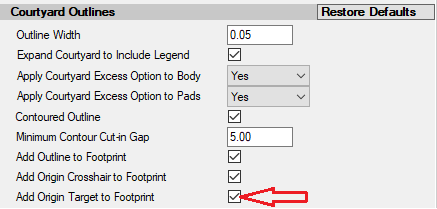 |
|
|
|
|
Post Reply
|
|
| Tweet |
| Forum Jump | Forum Permissions You cannot post new topics in this forum You cannot reply to topics in this forum You cannot delete your posts in this forum You cannot edit your posts in this forum You cannot create polls in this forum You cannot vote in polls in this forum |


 Topic Options