

|
|
Edited Footprint Name Does Not Appear In FPX Lib |
Post Reply 
|
Page 12> |
| Author | |
ckhalleran 
Active User 
Joined: 22 Nov 2017 Status: Offline Points: 26 |
 Post Options Post Options
 Thanks(0) Thanks(0)
 Quote Reply Quote Reply
 Topic: Edited Footprint Name Does Not Appear In FPX Lib Topic: Edited Footprint Name Does Not Appear In FPX LibPosted: 22 Sep 2021 at 11:11am |
|
After entering dimensions into Footprint Expert, and click "Calculate", and then Build Footprint... I'm able to edit the footprint name before clicking Create (so that my Altium footprint and Step file both have my edited footprint name).
But if I then click "Send to Library"... the new row in my FPX file has the original name for the footprint and Step file. I'd have to manually edit both of them. Could the edited name be sent to the FPX file instead? If I do the edit of footprint name, and then from the Footprint pane, I click "Add Footprint to Library" Regards, Chris
|
|
 |
|

|
|
|
|
|
Tom H
Admin Group 

Joined: 05 Jan 2012 Location: San Diego, CA Status: Offline Points: 6098 |
Post Options
Thanks(0)
Quote Reply
Posted: 22 Sep 2021 at 11:34am |
|
The correct way to change the default footprint name is in the Library Editor.
Enter the package dimensions, Calculate and Save to Library. Then edit the Footprint Name in the FPX file and it will be permanently changed. Then reopen the renamed footprint and select Build Footprint out to CAD tool. |
|
|
|
|
tgrodnicki
Advanced User 
Joined: 30 Sep 2014 Status: Offline Points: 141 |
Post Options
Thanks(0)
Quote Reply
Posted: 24 Sep 2021 at 1:55am |
|
This not always works.
If I create a footprint for a manufacturer not recognized by Footprint Expert, after re-opening saved footprint the prefix is missing. PCB Libraries Footprint Expert to CAD Translator window has no Footprint Name, hence translation is not possible. See attached screenshot. Maybe I should post a bug report.
|
|
|
|
|
Tom H
Admin Group
Joined: 05 Jan 2012 Location: San Diego, CA Status: Offline Points: 6098 |
Post Options
Thanks(0)
Quote Reply
Posted: 24 Sep 2021 at 8:35am |
|
FERYSTER is not in the Manufacturer List.
Can you send us one footprint from this mfr. so we can add it to POD and update the manufacturer list. Please include all the column data. In the meantime until we release V2021.17, you can update your local manufacturer list to include FERYSTER to your Footprint Expert program. The the FPX file library there is a dropdown menu called "Utilities" Select "Utilities > Edit Manufacturer List" and a dialog box will appear and fill it out like this: 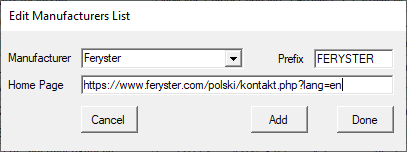 Then the mfr. Feryster will appear in your FP Designer Specifications panel and everything will work perfect. |
|
|
|
|
tgrodnicki
Advanced User
Joined: 30 Sep 2014 Status: Offline Points: 141 |
Post Options
Thanks(0)
Quote Reply
Posted: 26 Sep 2021 at 11:01pm |
|
Here's the library with Feryster DTSN-33/4,7/20-V footprint.
The Columns that I think are related to the Symbol Editor (which I don't have) are not filled. The footprint is not checked yet in manufacturing process.
|
|
|
|
|
Nick B
Admin Group

Joined: 02 Jan 2012 Status: Offline Points: 2106 |
Post Options
Thanks(0)
Quote Reply
Posted: 27 Sep 2021 at 11:13am |
|
Hi. I will email you the updated Manufacturer List.
It will also be updated in the next build.
|
|
|
|
|
Tom H
Admin Group
Joined: 05 Jan 2012 Location: San Diego, CA Status: Offline Points: 6098 |
Post Options
Thanks(0)
Quote Reply
Posted: 29 Sep 2021 at 12:39pm |
|
We updated the "Library > Utilities > Edit Manufacturer List" in the V2021.17 pre-release.
It's now much easier to add a new mfr. name to the program. |
|
|
|
|
tgrodnicki
Advanced User
Joined: 30 Sep 2014 Status: Offline Points: 141 |
Post Options
Thanks(0)
Quote Reply
Posted: 29 Sep 2021 at 11:53pm |
|
I'll check it out when you publish it.
|
|
|
|
|
tgrodnicki
Advanced User
Joined: 30 Sep 2014 Status: Offline Points: 141 |
Post Options
Thanks(0)
Quote Reply
Posted: 03 Oct 2021 at 11:34pm |
|
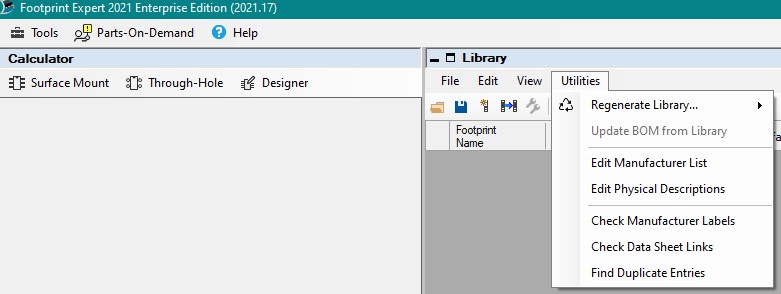
There is no Library> Utilities> Update Manufacturer List menu item.
 |
|
|
|
|
Tom H
Admin Group
Joined: 05 Jan 2012 Location: San Diego, CA Status: Offline Points: 6098 |
Post Options
Thanks(0)
Quote Reply
Posted: 04 Oct 2021 at 9:07am |
|
It's Edit Manufacturer List.
|
|
|
|
|
Post Reply
|
Page 12> |
| Tweet |
| Forum Jump | Forum Permissions You cannot post new topics in this forum You cannot reply to topics in this forum You cannot delete your posts in this forum You cannot edit your posts in this forum You cannot create polls in this forum You cannot vote in polls in this forum |


 Topic Options